
January 24, 2025 | 3 min read
How To Change Mobile Number in Aadhaar Card Online
Having your mobile number linked to your Aadhaar card is essential for accessing a range of online services and verifying your identity. Whether your mobile number has changed or is inactive, updating your Aadhaar-linked number is important to keep your records current with the UIDAI. However, the UIDAI has discontinued the option for online updates of mobile numbers on Aadhaar, meaning that all updates must now be completed offline. Here’s a comprehensive guide on how to change your mobile number in your Aadhaar card and why linking is essential.
How to Change Mobile Number in Aadhaar Card
If you need to change your mobile number in Aadhaar, you’ll need to visit an Aadhaar Enrolment Center. Here’s how to complete the process step-by-step:
1. Visit the Nearest Aadhaar Enrolment Center: Find your closest Aadhaar Enrolment Center through the UIDAI website.
2. Fill Out the Update Form: Request the ‘Aadhaar Update/Correction Form’ and fill it out with your current and updated details.
3. Biometric Verification: You’ll need to authenticate your identity with a biometric scan.
4. Submit the Form: Hand over the form to the executive at the center along with a service fee of Rs 50.
5. Receive an Acknowledgement Slip: You’ll be given a slip with an Update Request Number (URN), which you can use to track your request online.
6. Update Completion: Within 90 days, the new mobile number will be linked to your Aadhaar record.
Online Check: Aadhaar Card Mobile Number Linking Status
Once you’ve submitted your update request, you can easily check the status online. Here’s how:
1. Visit the UIDAI website and select ‘Check Aadhaar Update Status’ or directly go there via this link https://myaadhaar.uidai.gov.in/CheckAadhaarStatus
2. Enter the URN provided on your acknowledgement slip.
3. Input the CAPTCHA to verify.
4. Check your update status to see if your mobile number has been successfully changed.
How to Verify Aadhaar Card Linked with Mobile Number
There are two ways to confirm whether your mobile number is linked to your Aadhaar card:
Method 1: Using UIDAI’s ‘Verify Aadhaar Number’ Tool
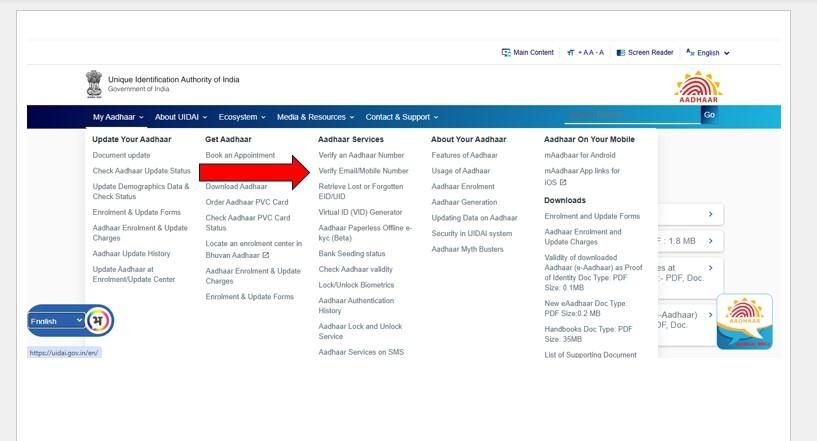
1. Visit the UIDAI website, then click on ‘Aadhaar Services’ and select ‘Verify an Aadhaar Number.’
2. Enter your Aadhaar number and CAPTCHA code.
3. Select ‘Proceed and Verify Aadhaar’ to see if your mobile number is linked.
Method 2: Verify Mobile Number with UIDAI
1. Go to UIDAI’s ‘Verify Email/Mobile Number’ section.
2. Select ‘Verify Mobile Number’ and enter your Aadhaar number, mobile number, and CAPTCHA code.
3. After selecting ‘Verify OTP,’ enter the OTP sent to your mobile to confirm the linking of your Aadhaar.
The same image below can be referred to for both methods.
Results of Not Linking Mobile Number with Aadhaar Card
If your mobile number is not linked to your Aadhaar card, you won’t be able to use various Aadhaar-based online services, including:
- mAadhaar App: This app allows you to carry your Aadhaar digitally.
- Online Aadhaar Services: Accessing your Aadhaar profile or making corrections online requires a linked mobile number.
- EPF Services: To make EPF claims and withdrawals online, linking your Aadhaar is essential.
- PAN Card Applications: Aadhaar-linked mobile numbers are mandatory for online PAN applications.
- Digital Locker: Access to DigiLocker requires Aadhaar-based verification.
- Mobile Re-verification: Telecom companies use Aadhaar for re-verifying mobile numbers.
- Mutual Fund Linking: Aadhaar number is required to link mutual funds for KYC and other verification processes.
Without a linked mobile number, accessing these essential services will be challenging, making it crucial to keep your Aadhaar record updated.
More Related Articles
EPFO new Aadhaar portal: What changes for PF account holders
 August 7, 2026 | 0 mins read
EPFO is building a new Aadhaar-based portal to help members trace old or inactive PF accounts, verify their identity, and move balances to an active UAN more easily. The new portal is expected to be especially useful for employees who worked before the UAN system was introduced in 2014.

What is Pradhan Mantri Garib Kalyan Yojana?
July 24, 2026 | 0 mins read
80% of India's 570 million workers are in the informal economy no written contracts, no job security, no social protection. When work stops, so does income. India has long needed a mechanism to deliver direct support to its most vulnerable not through institutions or intermediaries, but straight to the people who need it.

How to compare ₹10 brokerage plans with other brokers in India?
May 26, 2026 | 0 mins read
You may track the online share market closely, follow earnings, and plan entries and trades with precision. But the brokerage cost can shape the share of your profit that you finally get to keep. Low ₹10 brokerage plans at online trading platforms like m.Stock are easily accessible across all segments. But with so many distinct options, picking a suitable one can seem cumbersome.
FAQ
You can update key details such as your name, address, date of birth, gender, and mobile number. For biometric data and certain demographic information, updates must be completed offline at an Aadhaar Enrolment Center.