
August 19, 2026 | 10 min read
What Is a Robo Order in Intraday Trading?
Intraday trading often requires quick decision-making and timely execution. A delay of even a few seconds can affect trade outcomes, particularly in fast-moving markets. To address this challenge, many trading platforms offer automated order execution features that help traders manage entries, exits, and risk parameters more efficiently. One such feature is the robo order.
It allows you to place a trade along with predefined target and stop-loss levels in a single instruction. Robo orders automate key parts of trade management, simplify execution, and help traders follow a more structured intraday trading approach.
What Is a Robo Order?
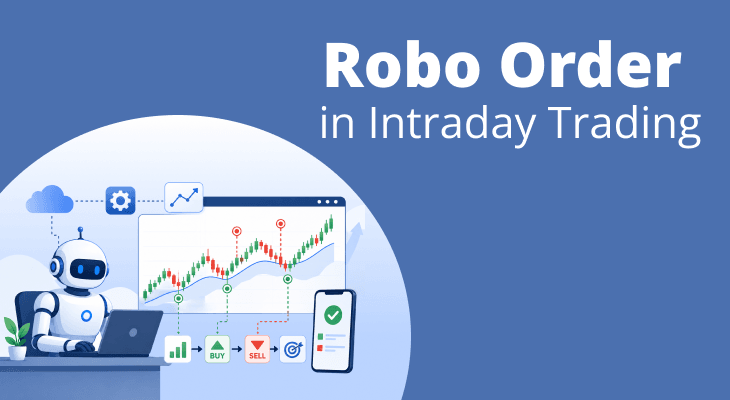
A robo order is an automated order type that allows you to place a trade along with a target price and stop-loss level in a single setup. Once the trade is executed, the system automatically monitors the predefined conditions and manages the exit process accordingly. This reduces the need to place separate orders after entering a position. Many intraday traders use robo orders to create a more organised trading process and manage risk more effectively. As part of a broader robo trade investment approach, these orders can help traders follow predefined plans and maintain greater consistency during fast-moving market conditions.
How Robo Orders Work in Intraday Trading?
Intraday traders often need to make decisions quickly while also managing risk. Here are the steps that are involved in robo trading:
Step 1: Identify a Trading Opportunity
The process begins when you spot a potential intraday trading setup based on your analysis, trading strategy, or market conditions.
Step 2: Define the Entry Price
You select the price at which you want to enter the trade. This can be a market order or a limit order, depending on your trading approach.
Step 3: Set the Profit Target
Before placing the trade, you specify the price level at which you would like to book profits if the market moves in your favour.
Step 4: Determine the Stop-Loss Level
You also define the maximum loss you are willing to accept on the trade. This helps establish risk parameters before entering the market.
Step 5: Submit the Order
Once all details are entered, the robo order is placed. After the entry order is executed, the platform automatically manages the associated exit instructions based on the predefined levels.
Example of a Robo Trade Investment
Suppose you buy a stock at ₹800 and set the following parameters:
Trade Details | Value |
|---|---|
Entry Price | ₹800 |
Target Price | ₹825 |
Stop-Loss | ₹790 |
If the stock rises to ₹825, the system exits the trade according to the target condition. If the price falls to ₹790, the stop-loss instruction becomes active and closes the position.
Why This Process Matters
By setting the target and stop-loss before entering a trade, you can approach intraday trading with a predefined plan. This reduces the need for continuous order management. It also helps ensure that risk-control measures are already in place when the trade begins.
Features of a Robo Trading App
Modern trading platforms offer more than basic order execution. A robo trading app integrates automation tools that help you manage entries, exits, and risk parameters. It also reduces the need for constant manual intervention during the trading session.
1. Predefined Target and Stop-Loss Settings
One of the most common features is the ability to set profit targets and stop-loss levels before entering a trade. This helps establish clear exit criteria from the outset.
2. Automated Order Management
After a trade is executed, the platform can automatically manage the associated exit conditions based on the parameters selected by the trader.
3. Quick Order Placement
Robo trading platforms are built to support fast execution. This can be particularly useful in intraday trading, where market conditions can change within seconds.
4. Real-Time Position Tracking
Most applications provide live updates on open positions, order status, and market movements, allowing traders to monitor their trades from a single interface.
5. Risk-Control Tools
Many platforms include features that help traders define and monitor risk levels before entering a position. This encourages a more disciplined trading approach.
6. Trade History and Performance Monitoring
Users can typically access records of completed trades, helping them review past decisions and evaluate trading performance over time.
Benefits of Using Robo Orders in Intraday Trading
Intraday trading often involves managing multiple decisions within a short period. From entering a position to monitoring exits and controlling risk, every step requires attention. A robo order can help simplify this process by combining key trade instructions into a single setup.
1. Encourages Pre-Planned Trading
A robo order requires you to define important trade parameters before entering a position. This promotes a more structured approach and reduces the tendency to make spontaneous decisions during market fluctuations.
2. Improves Execution Efficiency
Instead of placing separate orders for entry, target, and stop-loss, you can configure everything at once. This can make trade execution faster and more organised.
3. Supports Better Risk Control
By setting a stop-loss at the outset, you establish a predefined risk level before the trade begins. This helps ensure that risk management forms part of the trading process rather than an afterthought.
4. Reduces the Need for Constant Monitoring
Markets can move quickly, and it may not always be possible to track every price movement. Robo orders help manage predefined exit conditions automatically, reducing the need to watch the screen continuously.
5. Helps Maintain Trading Discipline
Emotions can influence trading decisions, particularly during periods of volatility. Automated execution of predefined instructions can help traders stick to their original trading plan.
6. Useful for Active Traders
Traders who take multiple positions during the day may find it easier to manage orders when target and stop-loss levels are linked to the trade from the beginning.
Types of Robo Orders Traders Use
Trading platforms may offer different variations of robo orders to accommodate different trading styles and risk preferences. Here are the types:
1. Long Position Robo Orders
These orders are used when you expect the price of a stock or security to rise. The trade begins with a buy order. The target and stop-loss levels then define the potential exit points for profit booking and risk management.
2. Short Position Robo Orders
These orders are designed for traders who anticipate a decline in price. The position begins with a sell order, and the predefined target and stop-loss levels help manage the trade after entry.
3. Fixed Target Robo Orders
In this approach, the trader specifies a fixed profit target before entering the market. Once the price reaches the selected level, the system automatically executes the exit instruction according to the predefined settings.
4. Fixed Stop-Loss Robo Orders
These orders focus primarily on limiting downside risk. A predetermined stop-loss level is linked to the position so that the trade can be exited if the market moves against the expected direction.
5. Target and Stop-Loss Combination Orders
This is one of the most commonly used formats in intraday trading. Both profit and risk parameters are defined before the trade begins, creating a more structured trade management framework.
Robo Order Strategy Example for Beginners
Understanding a practical example can help you see how a robo order fits into an intraday trading plan. The key idea is to define your entry, profit target, and risk limit before the trade begins, allowing the system to manage the execution based on those instructions.
Assume a stock is trading at ₹1,200 and shows signs of bullish momentum after breaking above a key resistance level. Based on your analysis, you decide to enter a buy position. At the same time, you set a target price of ₹1,235 and a stop-loss at ₹1,185.
Trade Component | Value |
|---|---|
Entry Price | ₹1,200 |
Target Price | ₹1,235 |
Stop-Loss | ₹1,185 |
Once the order is placed and executed, the platform automatically monitors the predefined exit conditions. If the stock moves higher and reaches ₹1,235, the position closes according to the target instruction. If the price declines to ₹1,185, the stop-loss instruction becomes active and exits the trade.
Robo Trading vs Manual Trading
Both robo trading and manual trading aim to achieve the same objective: executing trades based on a trading strategy. The key difference lies in how trade decisions and order management are carried out after a trading opportunity is identified. Here’s a comparison table to make you understand more clearly.
Aspect | Robo Trading | Manual Trading |
|---|---|---|
Order Execution | Executes predefined instructions automatically once conditions are met | Requires the trader to place and manage orders manually |
Trade Management | Handles target and stop-loss execution based on preset parameters | The trader manages entries, exits, and adjustments throughout the trade |
Reaction to Market Movements | Responds instantly according to programmed conditions | Response depends on the trader's availability and decision-making speed |
Emotional Influence | Helps minimise emotional decision-making by following predefined rules | Trading decisions may be influenced by fear, greed, or market sentiment |
Time Commitment | Requires less continuous monitoring after trade initiation | Requires active involvement and regular market observation |
Flexibility | Limited to the rules and conditions set before the trade | Allows real-time modifications based on changing market conditions |
Consistency | Executes the same trading rules consistently across trades | Consistency depends on the trader's discipline and experience |
Suitable For | Traders who prefer a structured and rule-based approach | Traders who prefer direct control and discretionary decision-making |
Risks and Limitations of Robo Trading
While robo trading can simplify trade execution and improve efficiency, it does not remove the risks associated with trading. Like any trading tool, its effectiveness depends on how it is used and the market conditions in which it operates.
1. Depends on User-Defined Inputs
A robo order follows the instructions provided by the trader. If the target, stop-loss, or entry conditions are poorly selected, the system will still execute them exactly as configured.
2. Cannot Interpret Market Context
Automated orders execute based on predefined parameters. They do not assess breaking news, changing market sentiment, or unexpected events unless those factors form part of the trading strategy.
3. Vulnerable to Sudden Price Movements
Sharp market fluctuations can occur within seconds. During highly volatile conditions, execution prices may differ from the intended levels, particularly in fast-moving markets.
4. Relies on Technology Infrastructure
Internet disruptions, platform outages, or technical issues can affect order placement and trade management. Although such situations may be infrequent, they remain a consideration when using automated tools.
5. May Create Overconfidence
Automation can make trading more convenient, but it should not replace market analysis and risk assessment. Relying entirely on automated execution without understanding the underlying trade can increase trading risks.
Who Should Use Robo Orders?
Its suitability often depends on how you manage trades and the level of involvement you want after entering a position. Here are the traders who may benefit from robo orders.
1. Traders Who Follow Rule-Based Strategies
If your trading decisions rely on predefined entry, target, and stop-loss levels, robo orders can help execute those plans more systematically.
2. Intraday Traders Managing Multiple Positions
Monitoring several trades at the same time can be challenging. Robo orders can help manage exit conditions across multiple positions without requiring constant manual action.
3. Traders Looking to Improve Discipline
Many traders struggle to follow their original plan once a position is active. By setting key parameters in advance, robo orders can help reduce impulsive trade management decisions.
4. Beginners Learning Risk Management
New traders often focus on finding trade opportunities but may overlook exit planning. Robo orders encourage the use of predefined targets and stop-loss levels as part of the trading process.
5. Traders With Limited Time During Market Hours
Not everyone can monitor markets continuously throughout the day. Robo orders can help manage predefined trade instructions even when you are not actively tracking every price movement.
Conclusion
Technology continues to influence the way traders interact with financial markets, and robo trading tools are one example of this shift. By combining automation with predefined trading instructions, robo orders can help bring greater structure to the trading process. However, their effectiveness depends on thoughtful planning, realistic expectations, and a clear understanding of market dynamics.
Automation can assist with execution, but it cannot replace trading knowledge or decision-making skills. Whether you are a beginner or an experienced trader, understanding how robo orders function can help you decide if they complement your overall trading approach and objectives.
More Related Articles

Advantages of Leverage Trading
 May 22, 2026 | 0 mins read
Leverage is an important concept in the stock market, that every trader should be aware of. It is a powerful tool that can help multiply your investment potential and returns. But what is leverage and why do traders choose to use it? Here’s everything you need to know about the concept of leverage and its various advantages.
How to Calculate Brokerage Charges in Intraday Trading
February 19, 2026 | 0 mins read
Intraday trading is a crowd-favourite, especially among stock market beginners. The constant tussle between buyers and sellers brings forth lucrative investment opportunities which are too good to pass. But high brokerage on intraday trading often eats into investors' profits and reduces their overall return on investment (ROI). This is why you must learn how to calculate brokerage on intraday trading to make better trading decisions.
Beginner's Guide to Day Trading
January 13, 2026 | 0 mins read
The trading world has many terms, and before stepping into this world, a good knowledge of different forms of trading terminology is a must. For example, if you are exploring the idea of day trading, it’s vital to understand exactly how it works, what tools you’ll need, and what you’re getting into. Day trading involves buying and selling securities within a single trading day, navigating rapid market moves, and using the right strategy. Whether you’re intrigued by day trading stocks, curious about a day trading platform, or just wondering what is day trading approach is, this guide will walk you through the top methods, risk management, and how to begin thoughtfully.
FAQ
A robo trading app can help beginners manage trades more systematically by allowing them to set predefined entry, target, and stop-loss levels. However, safety depends on how the tool is used. New traders should understand basic trading concepts, risk management principles, and platform features before relying on automated order functions.